
Download all attachments from Airtable – in one click
Airtable has no “download all” button. BaseDrop adds it: every file from a table, a filtered view or a whole base, saved as organized ZIPs.
Install freeGet Pro (one-time)Also available on the Chrome Web Store — one-click install, automatic updates.
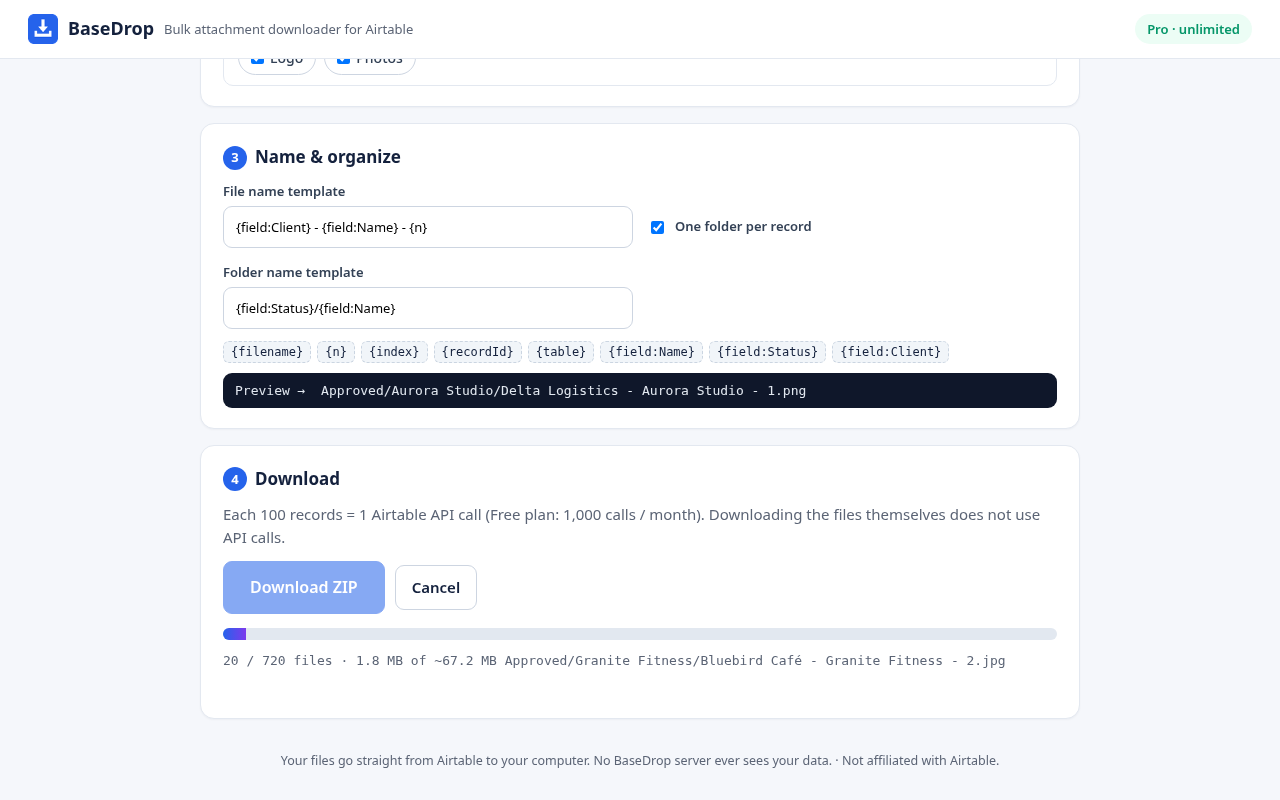
Organized, not a mess
Rename files after any field ({field:Client} - {field:Name}), one folder per record, plus an index.csv mapping every file to its record.
Private by design
Files go straight from Airtable to your computer. Read-only token, stored only in your browser. No BaseDrop server sees your data.
Built for big tables
Respects Airtable's rate limits, retries failures and splits large exports into multiple ZIP parts.
Works on the Free plan
Uses the official Airtable API. 1 API call per 100 records – and BaseDrop tells you exactly how many calls each run used.
Free vs Pro
| Free | Pro – $19 one-time | |
|---|---|---|
| Files per run | 50 | Unlimited |
| Table or view, index.csv | ✓ | ✓ |
| Rename by field templates | – | ✓ |
| Folder per record (nested) | – | ✓ |
| Whole-base export | – | ✓ |
| Full backup: records.csv/json + files + schema, incremental | – | ✓ |
| Browsers per license | – | 3 |
FAQ
Does Airtable let you download all attachments at once?
Not natively. Airtable has no built-in button to download every attachment in a table, so you normally open each file one by one. BaseDrop adds that missing bulk download.
How do I download all attachments from an Airtable table?
Install BaseDrop, paste a read-only personal access token, pick the base, table (and optionally a view) and the attachment fields, then click Download ZIP. Every file is saved into organized ZIP files with an index.csv.
Does it work on the Airtable Free plan?
Yes. BaseDrop uses the official Airtable Web API, which is available on the Free plan. Listing records costs 1 API call per 100 records (Free plan: 1,000 calls per workspace per month). Downloading the files themselves does not use API calls, and BaseDrop shows exactly how many calls each run used.
Is my data safe?
Your token is stored only in your browser and only sent to api.airtable.com. Files go straight from Airtable's file servers to your computer – they never pass through a BaseDrop server. The token only needs read scopes.
Can I rename files after a field?
Yes (Pro). Use templates such as {field:Client} - {field:Name} - {n}, and optionally put each record in its own folder, including nested folders like {field:Status}/{field:Name}.
What about very large tables?
BaseDrop downloads with rate-limit-safe pacing (under Airtable's 5 requests/second), retries failed files, and splits big exports into multiple ZIP parts so your browser does not run out of memory.
Can I export a whole base?
Yes (Pro). Whole-base mode exports every table that has attachment fields, one folder per table.
What does the free version include?
Up to 50 files per run with original file names, from any table or view, plus index.csv. Pro removes the limit and unlocks renaming, folders, whole-base export and full backups.
Can BaseDrop back up records as well as files?
Yes (Pro, v1.1). Full backup mode writes, for every table, records.csv and records.json whose attachment cells point to the saved files by relative path, plus schema.json and manifest.json. Incremental mode skips files saved by an earlier backup of the same base; extract all backup ZIPs of a base into one folder. An optional Notion-import CSV is included. Automations, interfaces and formula definitions are not available through the API and are not included.
How does the license work?
Pro is a one-time purchase on Payhip. You receive a license key by email; paste it into BaseDrop. One key works on up to 3 of your own browsers. Refunds automatically deactivate the key.
Is BaseDrop made by Airtable?
No. BaseDrop is an independent tool and is not affiliated with or endorsed by Airtable.